
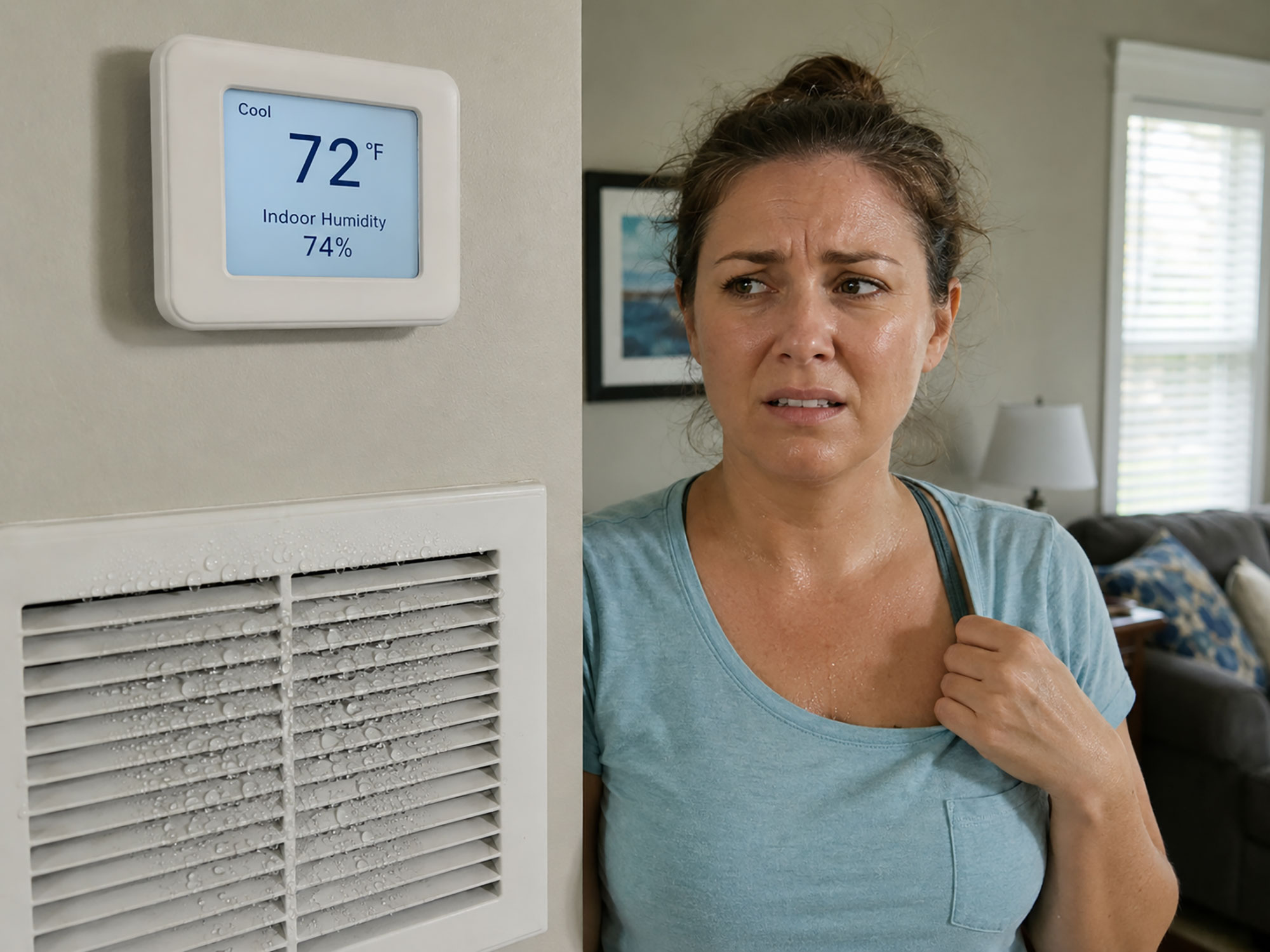
Key Takeaways: Why Your Home Feels Humid at 72°F
- Sensible vs. Latent Cooling: Air conditioners must remove heat and moisture. If the cycle is too fast, temperature drops while water vapor stays trapped.
- Oversized AC Units (Short-Cycling): A system that is too large blasts cold air quickly and shuts down before the evaporator coil can condense moisture out of the air.
- Thermostat Fan Setting: Setting your thermostat fan to ON instead of AUTO continuously blows evaporated moisture from the drain pan back into your home.
- Ductwork Leaks in Hot Attics: Unsealed return ducts pull superheated, moisture-laden attic air straight into your home’s air supply.
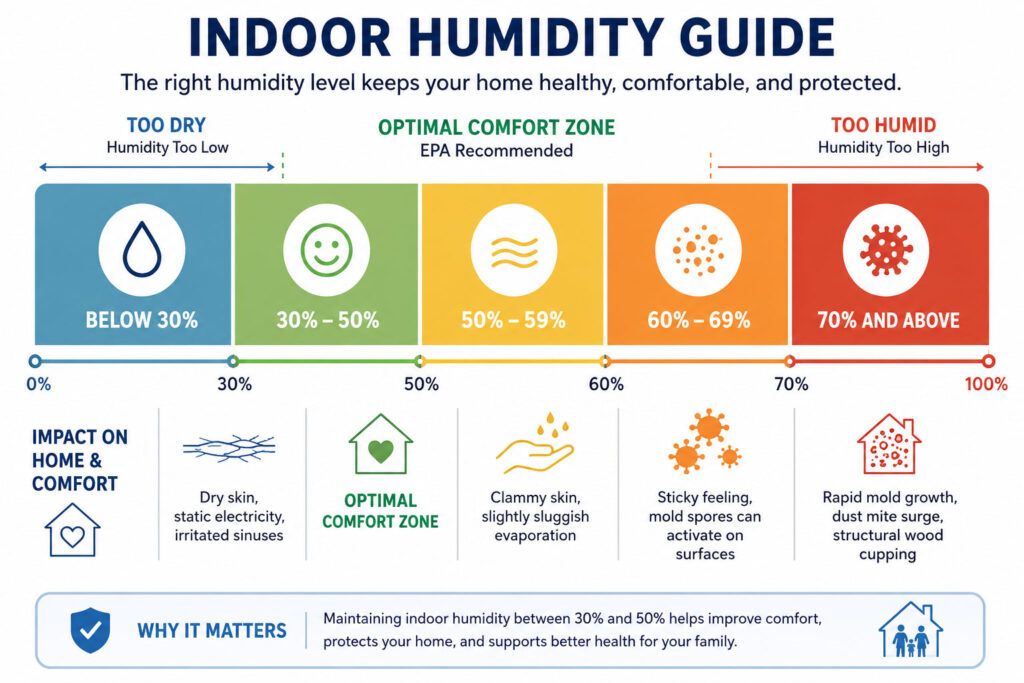
- Target Indoor Humidity: The EPA recommends keeping indoor relative humidity between 30% and 50% (never exceeding 60%).
If your thermostat reads a crisp 72°F but your indoor air feels clammy, heavy, or sticky, your air conditioning system is cooling your home without properly dehumidifying it. In climate zones like Spring, The Woodlands, and the greater North Houston area, extreme outdoor humidity demands that an air conditioner remove moisture just as effectively as it lowers air temperature.
When an AC unit fails to balance sensible cooling (lowering temperature) with latent cooling (extracting airborne water vapor), relative indoor humidity climbs above the recommended 30%–50% comfort range. The result is a cold, clammy living environment, higher utility bills, and elevated risks of mold and mildew growth.
The Physics of Indoor Comfort: Temperature vs. Relative Humidity
Human comfort is dictated by the rate at which perspiration evaporates from your skin. High humidity slows this natural cooling process, making the ambient temperature feel warmer than the thermostat reading indicates.
When your air conditioner runs:
- Warm, moist return air passes over the cold evaporator coil (typically running at 40°F–45°F).
- The air cools below its dew point, causing moisture to condense onto the coil surface.
- Liquid water trickles down into the primary condensate drain pan and exits the home via the drain line.
- Dehumidified, chilled air is distributed through the supply ducts.
For this condensation process to work, warm air must move across the cold coil for an extended, uninterrupted cycle—usually 15 to 20 minutes minimum. If the cycle is cut short, temperature drops, but moisture remains suspended in the air.
6 Reasons Your Home Feels Humid Despite a Low Thermostat Setting
1. The AC Unit Is Oversized (Short-Cycling)
In HVAC engineering, bigger is not better. When a contractor installs a 4-ton unit where a 3-ton unit is needed, the system cools the square footage rapidly and reaches the thermostat setpoint in 5 to 8 minutes.
Because moisture removal requires prolonged airflow over the coil, short-cycling drops the sensible temperature while leaving relative humidity at 60%–70%. The air feels chilly yet thick and sticky.
2. Thermostat Fan Set to “ON” Instead of “AUTO”
Running the thermostat fan on ON keeps the blower motor spinning 24/7, even when the outdoor condenser compressor shuts off.
When the cooling cycle finishes, the evaporator coil and drain pan are covered with condensed water droplets. Continuous blower operation evaporates this water right back into the ductwork, blowing gallons of humidity back into your living spaces.
Pro Tip: Always keep your thermostat set to AUTO. In AUTO mode, the fan only runs when the cooling system actively dehumidifies.
3. Leaky Return Air Ducts in Unconditioned Attics
In Southeast Texas homes, attics frequently reach 130°F–140°F with extreme humidity during the summer. If the return plenum or duct joints have cracks, loose tape, or disconnected collars, the negative pressure of the return air system pulls humid attic air directly into the HVAC stream.
This introduces unconditioned moisture faster than the evaporator coil can wring it out.
4. Dirty Evaporator Coil or Clogged Air Filter
A dust-clogged air filter or a dirty evaporator coil restricts airflow. Reduced airflow disrupts coil temperatures, causing the system to lose cooling efficiency. In severe cases, the coil freezes into a block of ice, blocking dehumidification completely and risking water damage to your ceilings.
5. Low Refrigerant Charge (Refrigerant Leaks)
Air conditioning systems do not consume refrigerant; they circulate it in a closed loop. If a pinhole leak develops in the copper lines or coil, the system loses cooling capacity.
A low refrigerant charge changes the pressure dynamics across the thermal expansion valve (TXV), preventing the coil from reaching the correct temperature profile needed to condense moisture out of the air.
6. High Infiltration from Building Envelope Gaps
Warm, humid air constantly seeks equilibrium with cooler indoor air. Gaps around exterior doors, unsealed windows, recessed can lights, and bathroom exhaust dampers pull outdoor air into your wall cavities and living spaces via the stack effect.
Comparing HVAC System Configurations for Humidity Control
Different HVAC system types handle humidity control with varying levels of efficiency:
| System Type | Compressor Stages | Dehumidification Capability | Energy Efficiency | Best Suited For |
| Single-Stage AC | 1 (100% capacity only) | Fair / Low (Prone to short-cycling in mild weather) | Standard | Budget replacements, dry climates |
| Two-Stage AC | 2 (High ~100%, Low ~65–70%) | Good (Runs longer at lower capacity to pull moisture) | High | Balanced comfort, moderate humidity |
| Variable-Speed Inverter | Continuous modulation (25%–100%) | Superior (Runs almost continuously at ultra-low speeds) | Maximum (Up to 20+ SEER2) | High-humidity regions (Gulf Coast) |
| Whole-Home Dehumidifier | Dedicated refrigeration circuit | Maximum (Controls RH independently of temperature) | High (Relieves AC load) | Extreme humidity, tight modern builds |
Health, Structural, and Energy Risks of High Indoor Humidity
Allowing indoor relative humidity to hover above 55%–60% creates several cascading problems:
- Dust Mite and Mold Proliferation: Dust mites thrive at humidity levels above 50%, and mold spores actively germinate on drywall, baseboards, and HVAC supply vents at relative humidity levels of 60% and above.
- Perceived Temperature Penalty: High humidity prevents sweat from evaporating, making a 72°F room feel like 76°F. Homeowners frequently drop the thermostat to 68°F or 66°F to compensate, which drives up electric bills and accelerates mechanical wear on the compressor.
- Wood and Finish Damage: Persistent moisture causes hardwood floors to cup, door frames to stick, and drywall paint to blister or peel.
Step-by-Step Diagnostic Checklist for Homeowners
Before calling a professional technician, perform these initial system checks:
- Verify Thermostat Fan Setting: Confirm the fan switch is set to AUTO, not ON.
- Inspect the Air Filter: Check your 1-inch or 4-inch media filter. If it is coated with grey dust or pet hair, replace it immediately.
- Monitor Relative Humidity: Purchase an inexpensive digital hygrometer. Check if the reading stays above 55% during the hottest parts of the day.
- Check the Condensate Line: Locate the PVC drain line outside near the condenser. When the AC runs, verify that a steady, continuous trickle of water is draining.
- Inspect Supply Registers: Place a hand over the supply vents. If the airflow feels weak, warm, or restricted, the system may have duct leaks, blower issues, or a frozen coil.
Professional Solutions to Eliminate Indoor Stickiness
If simple setting adjustments and filter replacements do not resolve indoor stickiness, a licensed HVAC contractor can implement structural and mechanical solutions:
1. Static Pressure and Airflow Calibration
A technician checks the system’s external static pressure and adjusts blower motor tap speeds. Lowering CFM (cubic feet per minute) airflow slightly across the evaporator coil drops coil temperature, increasing moisture condensation without freezing the line.
2. Manual J Load Calculation
If replacing an aging unit, insist on an ACCA Manual J Load Calculation. This calculation factors in home orientation, window efficiency, insulation levels, and local design temperatures to select the exact tonnage required, preventing oversized short-cycling.
3. Upgrading to Variable-Speed Inverter Technology
Modern variable-speed systems adjust output in 1% increments. On humid, 82°F mornings, the system runs quietly at 35% capacity for hours, continuously stripping moisture out of the air while using a fraction of the electricity of a standard single-stage unit.
4. Dedicated Whole-House Dehumidification
Integrating a whole-home dehumidifier (such as an AprilAire or Santa Fe unit) into your existing ductwork allows you to manage humidity independently of temperature. The dehumidifier removes up to 100+ pints of water per day, allowing you to set the thermostat to 75°F or 76°F while enjoying a cool, crisp feel throughout the home.
Frequently Asked Questions
According to the EPA and ASHRAE, indoor relative humidity should remain between 30% and 50%, and should never consistently exceed 60%.
Yes. If your HVAC system is not designed to handle high-resistance filters (such as MERV 13+ in standard 1-inch slots), the reduced airflow can cause the coil to run improperly, reducing dehumidification efficiency and risking a frozen evaporator coil.
This typically points to duct leaks in an unconditioned attic pulling in humid outdoor air, a low refrigerant charge preventing the coil from reaching condensation temperature, or a system with incorrect blower speed settings.
Restoring Crisp, Dry Comfort to Your Home
Living with sticky, humid indoor air is uncomfortable and can compromise your home’s air quality and structural materials. If your thermostat shows a cool temperature but your home still feels like a sauna, your air conditioning system is signaling an airflow, sizing, or operational issue.
For homeowners in Spring, The Woodlands, Tomball, and North Houston, Majestic AC provides complete HVAC diagnostic services, airflow balancing, duct sealing, and whole-home dehumidification solutions.